

The email campaign overview lets you see quickly and easily how many of your recipients have opened your email, how many have bounced, and how many are yet to open the email.
You can also view how many have clicked a link, unsubscribed, or marked your email as spam.
The most popular links on your email are also easily viewed.
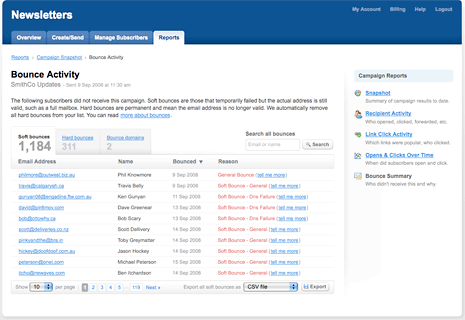
As our mailing system automatically handles your email bounce backs, The email campaign bounce activity lets you see which email addresses have bounced, and why. You can clearly see whether the email has bounced due to "soft" reasons (ie full mailbox) or "hard" reasons (ie email address does not exist anymore).
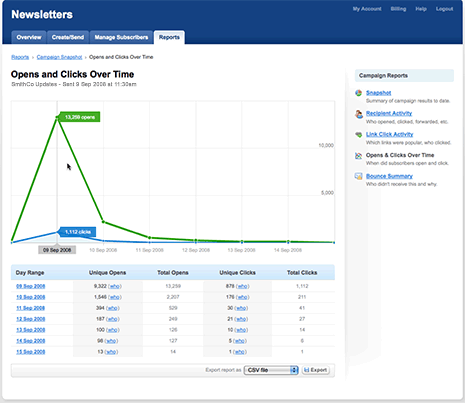
Clicking on the opens and link clicks over time, you can see in real time, who has opened your email marketing campaign, and what links they have clicked. From this, you can track times of the day people are viewing your campaign, what links have worked for you, and make important strategic decisions regarding your next campaign.
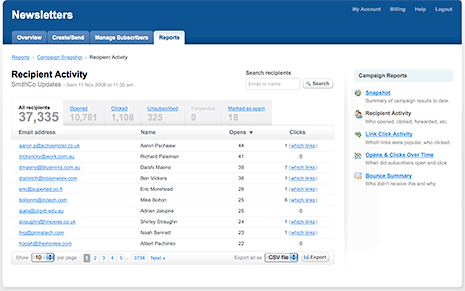
The recipient activity statement allowes you to see, by recipient, who has opened your email, how many times, and the links they have clicked through to your site. This is broken down to each recipient, so you can watch everything that is happening throughout your email campaign.
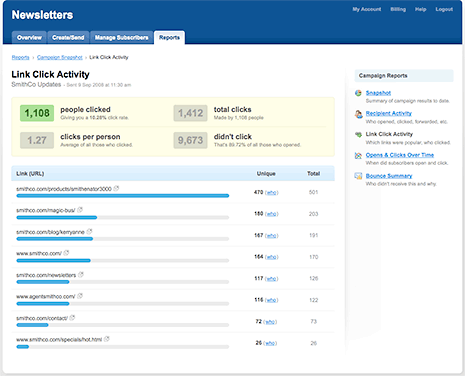
The Link activity report allows the sender to view exactly which links have been attractive to the recipients, and also, which ones have not. This allows you to tweak future campaigns accordingly.